


RollerCoaster Tycoon 3
All custom scenery, attractions, parks, fireworks, and more for RollerCoaster Tycoon 3.
No files in this category yet.
Files from subcategories
-
Author: StationJimJr.
A nice collection of walls, beams, torture devices, chains, shackles and ruins.
- 171 Downloads
-
Author: StationJimJr
Stone wall set in a variety of positions including straight, sloped, curved, and diagonal pieces. Download contains basic instructions for changing the original texture to make your own custom walls.
- 119 Downloads
-
Author: kiotho
These sets, contain the same dragon-model I created Years ago, for my dark-ride "Journey to The Lost Tower". You can see the full video here:
https://youtu.be/5dJXuBTfoL8?si=ZZBli1IQ0RCTl-jJ
Please note, these models were one of the first "advanced" objects I made. It was also my first successfull animation, in RCT3. Thanks a lot to StationJimJr for helping me out with these and by teaching me the basics of xml-animations!
Have Fun!
- 81 Downloads
-
Author: Kiotho
This is the first version of my set "Kiotho's Adventure Things!". This set was originally created for World Of Wonders, a park I'm creating together with CoasterdesignerNo1. This set features 242 objects (for now, as I'm still expanding it). It includes, Mayan statues, mirrors (fireworkbases), skull heads, animated objects such as poles that open when the car passes by (spears), doors, wooden walls, lots of rocks (this part will be expanded too), and much more such as torches,... I suggest downloading the set, to discover everything by yourself 8)
Topic featuring video's and ingame stuff: http://www.shyguysworld.com/index.php?topic=16413.0
Thanks for downloading! In case you'd like to see certain object(s) added to the set, or in case you find bugs, please ask/tell me in my topic!
Have fun!
Technical info:
Shared textures: Yes
In-game Location: Walls (Kiotho's Adventure Things!) AND Scenery (Kiotho's Rockwork)
Special CSO's: Ride-events, Nearly all skull heads, Mayan mirrors, snakes, and torches have "hidden" firework bases, so you can use them as launcher bases too :D
- 147 Downloads
-
Author: StationJimJr
A small set of Six Flags signs. 3 sizes with straight and diagonals for each.
- 138 Downloads
-
- 78 Downloads
-
- 104 Downloads
-
This Tutorial will show you from beggining till end, on how to make a Custom Track!
Originally posted on CSDepot: November 02, 2012
- 41 Downloads
-
Thanks for downloading CPcisco's B&M Track Retexture! PLEASE READ THE README!
!!WARNING!!: This has the possibility to mess up your Rollercoaster Tycoon 3 game if not done correctly. USE AT YOUR OWN RISK. Make sure to save a copy of the original texture OVL in a safe place before proceeding.
Installation: THESE STEPS MUST BE FOLLOWED EXACTLY AS STATED!
--------------
1) Navigate to C:\Program Files\Atari\RollerCoaster Tycoon 3 Platinum\tracks\coasters\Track5. C:\ is being used as a generic hard drive location, you may have a different letter.
2) Find the two files at the bottom of the list named "Track5_Textures.common.ovl" and "Track5_Textures.unique.ovl".
3) Select both of these and copy and paste them into a safe place on your computer.
4) Now open the folder labeled "New OVLs" in the "CPcisco's B&M Track Retexture" folder. There should be two files here named, "Track5_Textures.common.ovl" and "Track5_Textures.unique.ovl".
5) Select both of these files and copy and paste them into the "Track 5" folder. Click "yes" to overwrite the previous files as you have them saved in a safe place.
6) Open the game and the new textures should be applied to any track that uses the B&M style track.
Originally posted on CSDepot: August 26, 2010
- 33 Downloads
-
Author: Weber
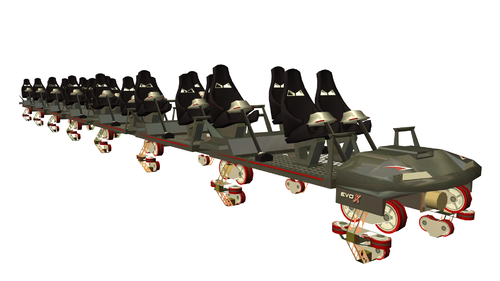
The next evolution in CTR design. Featuring a B&M style chassis, racing sports car looks.
Reuploaded by: Wilhelm1407
I have created all new high res screenshots for this CTR download. Enjoy! 🙂
- 119 Downloads
-
Author: Weber
This CTR is an 8 seat dive machine designed after the Griffon at Busch Gardens. There is also a Generic recolorable version included.
Reuploaded by: Wilhelm1407
I have created all new high res screenshots for this CTR download. Enjoy! 🙂
- 132 Downloads
-
Author: Weber
Generic and Tropical themed Giga CTRs
Reuploaded by: Wilhelm1407
I have created all new high res screenshots for this CTR download. Enjoy! 🙂
- 174 Downloads
-
Author: Weber
A CTR for the little ones in your park.
Reuploaded by: Wilhelm1407
I have created all new high res screenshots for this CTR download. Enjoy! 🙂
- 120 Downloads
-
Author: Weber
A recreation of the El Loco coaster. This CTR features unique animated restraints.
Reuploaded by: Wilhelm1407
I have created all new high res screenshots for this CTR download. Enjoy! 🙂
- 156 Downloads
-
Author: Weber
An inverted CTR that features: 3 choices of cars, recolorable textures, and 5 seats per row.
Reuploaded by: Wilhelm1407
I have created all new high res screenshots for this CTR download. Enjoy! 🙂
- 73 Downloads
-
Author: Weber
A spinning coaster CTR with an industrial sci-fi theme. It features a pivot bone (which allows you to control the direction of spinning, when designing your track) as well as fully animate restraints.
Reuploaded by: Wilhelm1407
I created new high res screenshots for this download. Enjoy! 🙂
- 91 Downloads
-
Author: Weber
A CTR designed after the Halo Ghost vehicle from the very popular Halo game series.
Reuploaded by: Wilhelm1407
I created new high res screenshots for this download. Enjoy! 🙂
- 63 Downloads
-
borders lamps tables umbrellas trashcan ... on the theme of Adventureland from Disneyland Paris
Author/Creator: Thiery/PLT
- 130 Downloads
-
Shiggs713's Path Covers - Expanded offers 69 more pieces and 3 new textures from the previous version. Now featuring Stone, Old Concrete, and Granite. The new ones are all recolorable and I added addition pieces for the Greenish Blue Brick from my first path cover set.
Some pieces come in both conforming and non, so it can be a bit redundant, but this is only to add to their versatility. Now you can build lifted station platforms over a lake, or winding paths down a hill all with the same textures. Mix and match with pretty much any other path cover or edge.
All the conforming pieces are found in Foliage and all the Non conforming pieces are found in Walls Ect, and are organized to make things fairly easy to find what you need. As always, all pieces use 1/4 placements for optimal versatility and use shared textures so you can use them in abundance without fear of lagging your game down. Enjoy 🙂
You can find the original Shiggs713's Path Covers here
Author/Creator: Shiggs713
- 207 Downloads
-
SET FINALLY RELEASED!
Includes a variety of different colored sparkles in 2 different sizes.
Colors include:
-White
-Red
-Green
-Green-Blue
-Blue
-Yellow
-Brown
-Pink
(Oh yeah, and a magic orb too! 😎)
Also, please remember that these cover fairly large areas. Too many particles will cause lag, so avoid overkill.
Enjoy!
Author/Creator: Xynaxus
- 36 Downloads
-
Since Megaupload went down. I have chosen to upload it here. Thanks everybody that downloads it!
Author/Creator: LoneWolf
- 148 Downloads
-
This set is easy to use because it has standard pieces. But you can also use it in combination with shy's planters.
This set lets you make more special paths with curves and more. I have also added a conforming piece of path so you can make it go up a hill.
Author: briantjuh94
Author/Creator: briantjuh94
- 58 Downloads
-
This set is easy to use because it has standard pieces. But you can also use it in combination with shy's planters.
This set lets you make more special paths with curves and more. I have also added a conforming piece of path so you can make it go up a hill.
Author: briantjuh94
Author/Creator: briantjuh94
- 61 Downloads


.thumb.png.d74b7ca37cc0f4f424c8efb46017a354.png)
.thumb.png.9b183a7b126fbf48f10dc5144bb2860e.png)


.thumb.png.83ba2ba9c022be95a3c2d9365b6d6ff6.png)


