Custom Scenery
All custom scenery files for RollerCoaster Tycoon 3.
2,077 files
-
This was my first piece of custom scenery ever made a few years ago when I was eleven. It is a simple marble stand with a drink sign and a YAY! sign to go on the sides. They are attachable (Not all one) and is convenient anywhere! Special thanks to shyguy for recovering this file from the long lost Vodhin.org. 🙂
Author/Creator: Coasterboy
- 32 Downloads
-
This is the BETA release of my Water Works CS Set. This set was designed to expand the capabilities of water parks by adding curve pool decks and railings, as well as slide exits, pool chairs, and more rafts. As stated, this is the beta for the set.
Note: This post has been updated on 4/20/13 to re-add the download. No further changes have been made to the set, as I've not touched the game in months.
Author/Creator: LostThought16
- 172 Downloads
- 2 Comments
-
Beams, walls, decking, rope bridges and a thatched roof to create a tree house in the jungle. 113 pieces in total 🙂
Author/Creator: StationJimJr
- 321 Downloads
-
Hey all!
Here is my set that goes on either the inverted coaster or flying coaster's station. These are NOT animated.
Author/Creator: CoasterBeta
- 29 Downloads
-
A set with beams.
The basic 1h,2h,3h, etc.
But also loose diagonal/ hd1/ 0,5 by 1 RCt3 tile beam
Big Thunder Mountain like supports
details for making windows/fences/etc.
You can just do a lot of things with it!
Objects: 116
Author/Creator: Pat
- 77 Downloads
-
Contains Drains, planter boxes and asphalt covers
Place in style/Themed folder.
Author: Aceana
Author/Creator: Aceana
- 117 Downloads
-
156 pieces in total from walls to windows, pillars to partitions and beams to bonsai trees! Have fun! 🙂
EDIT: Version 1.2 - The objects are exactly the same as v1.1, the only difference being that I've moved a third of the items into the flowers menu to help navigate better.
EDITED EDIT: A fault with v1.2 meant that the objects in the foliage menu snapped to the ground when placed. This has now been fixed in v1.3. Apologies for the inconvenience, it won't happen again! 😝
EDITED EDITED EDIT: V1.4 - The objects formerly found in the foliage menu have now been moved to the scenery/scenery items menu thus stopping them annoyingly appearing outside your parks! 🙄
IMPORTANT - If you have v1.1, v1.2 or v1.3 installed, you'll need to delete it from your themed folder completely and then install the new version. If you simply overwrite it, the objects in the scenery menu will not show up.
Any items already in your parks will not disappear (I've checked 😝), this is just to split up the amount of objects and to fix bugs.
Thanks 🙂
Author/Creator: StationJimJr
- 297 Downloads
-
132 furniture items to spruce up your interiors! Chairs, beds, lights and an Atari 2600 😄 Have fun!
Author/Creator: StationJimJr
- 269 Downloads
-
- 40 Downloads
-
- 164 Downloads
- 1 Comments
-
- 185 Downloads
-
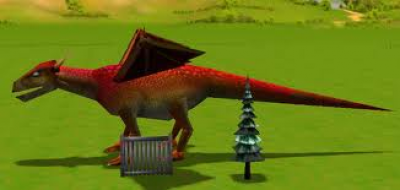
Consist of a big red dragon, tall snow tree, metal fence
Place in style/themed folder
Author: Eletigna
Author/Creator: Eletigna
- 44 Downloads
-
My very first Custom Scenery Set
All the pieces included are shown in the screenshot.
Please, Enjoy!
by Bafke
Author/Creator: Bafke
- 58 Downloads
-
- 158 Downloads
-
Catwalk set and accessories.
by aroundthehorn (LightGrenades)
Author/Creator: aroundthehorn (LightGrenades)
- 174 Downloads
-
- 98 Downloads
-
Construction set featuring large machinery and various items you'd find in a construction yard.
by |Aces|
Author/Creator: Aces
- 86 Downloads
-
Created: 08/05/09. This is the only piece from my failed Epcot custom scenery set. I hope it will find some sort of use for some members. Enjoy.
by Albert Caine
Author/Creator: Albert Caine/CaptainEO
- 59 Downloads
-
Created: 02/01/11. A Drive Thru Set that I decided to make.
Make sure you place the folder in the Style/Themed Directory.
Thanks For downloading!!!
Author/Creator: 182470
- 27 Downloads
-
- 61 Downloads
-
My first set.
I have more on the way... enjoy.
Install in the typical location
Set is located under the safari theme.
Originally created by Safari J
- 109 Downloads
-
this set contains my nets, catwalks and poles from the set I used in my Cherry Chreek Canyon park. Enjoy!
Originally created by CoasterJoe
- 115 Downloads
-
Install in typical Style/Themed location
Over 150 pieces to make classic Arrow style coasters.
Also works well for Flume supports.
Instead of being a generic building set, each piece is corresponds to a track section. Read the description
for the part to add it to your track.
At some point I will re-release this set with icons for each piece.
Parts include:
Arrow like inversion supports both old style (arches) and later model (posts), Scaffold type supports, Post type supports, Supports for curves and helix's.
All vertical pieces have a corresponding footers as well.
Also included is a lift hill chain system (base motor, chain return ect)
Enjoy
Originally created by Safari J
- 274 Downloads
-
Supports, cat-walks, and other framing for roller coasters.
Originally created by JCat
- 657 Downloads
-
Space themed goodies including star walls and Star Wars items
Originally created by JCat
- 245 Downloads