Cody
Moderators
-
Joined
-
Last visited
Everything posted by Cody
-
 Since some people throughout the net has been looking for some Pokemon scenery I decided to make this set. The set includes: 2 Pokemon Themed Stalls- Snorlax Snax and a Nurse Chansey First Aid Stand 4 Pokemon CS- Onyx, Diglett, Dugtrio, and Lunatone Author: DarkPokefan21 Author/Creator: DarkPokefan21
 -
 A group of sets comprising 4 footers. Author: Cmoney Author/Creator: Cmoney
 -
 A station cover. Author: Cmoney Author/Creator: Cmoney
 -
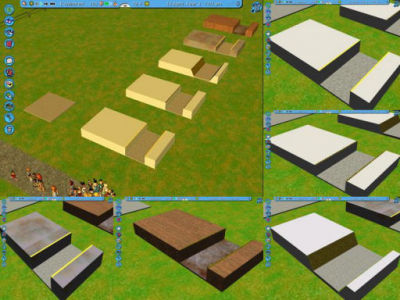 Station covers with different textures. Author: Cmoney Author/Creator: Cmoney
 -
 Two sets of Arial font letters, wall mounted and regular. Author: Caffinated (Cafeen) Author/Creator: Caffinated (Cafeen)
 -
 Turnstiles. Author: Caederus Author/Creator: Caederus
 -
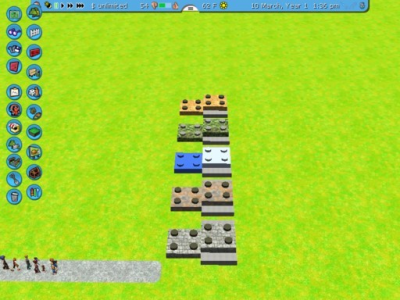 Textured Footers. Author:Cadycrossover Author/Creator: Cadycrossover
 -
 89 pieces including walls, damaged walls, an animated bell, crooked beams and a stagecoach. Have fun! 😀 Author/Creator: StationJimJr
 -
 my rnrc beta set 😄 Author/Creator: superlegochannel
 -
 A machine that makes smoke. 😉 Author: C1hrisin Author/Creator: C1hrisin
 -
 Brick path covers and edges. Author: C1hrisin Author/Creator: C1hrisin
 -
 Set of rustic ramps and supports. Author: C1hrisin Author/Creator: C1hrisin
 -
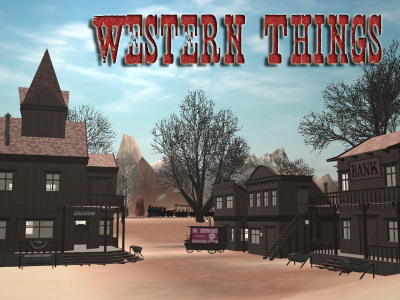 143 western pieces including walls, windows, fences, flags, billboard signage, lamps and a medicine wagon. Have fun 🙂 EDIT-Western Things 1.1 The original set needs to be deleted from your Style/Themed folder completely before installing v1.1. You will not lose any work by doing this. V1.1 has recolourable wall and trim textures added and some of the objects in the foliage menu are now in the scenery menu. Don't be alarmed by the large(ish) file size, included are 2 texture OVLs. The orignal non-recolourable textures and the new, recolourable ones. It's recolourable by default but should you want the old textures, copy the 2 files from Texture OVLs/Original folder (stationjimjrWesternThings-texture.unique.ovl and stationjimjrWesternThings-texture.common.ovl) and paste into Style/Themed/stationjimjrWesternThings/shared. Again, you can switch between the two without fear of losing any work. Many thanks to bzjr68 for pointing out the menu errors!!! Author/Creator: StationJimJr
 -
 The updated version of Bridgepiece's Sword in the Stone. Beautiful for medieval themes! Author: Bridgepiece Author/Creator: Bridgepiece
 -
 This Superman logo will be sure compliment your Superman rides! Author: Bridgepiece Author/Creator: Bridgepiece
 -
 This is a simple piece to place near your Batman Ride. Author: Bridgepiece Author/Creator: Bridgepiece
 -
 Batman-themed coaster station. Author: Bridgepiece Author/Creator: Bridgepiece
 -
 Completes the trilogy! 😀 Contains longboats, weapon racks, canopies, crates, banners, flags and general Viking clutter. 64 pieces 🙂 Author/Creator: StationJimJr
 -
 I love this set! Do note that currently some items do not appear in-game but are listed in the file directory (mostly Tower Of Terror and possibly other objects). Thank you for uploading Knight Rider!
 -
-
 Sequel set with a wealthier flavour. Contains 88 pieces including wooden and plaster walls, decorations and a wooden roof. Author/Creator: StationJimJr
 -
 97 pieces including wooden walls, a thatched roof, beams and decorations of a Viking nature 🙂 Author/Creator: StationJimJr
 -
 borders lamps tables umbrellas trashcan ... on the theme of Adventureland from Disneyland Paris Author/Creator: Thiery/PLT
 -
 Shiggs713's Path Covers - Expanded offers 69 more pieces and 3 new textures from the previous version. Now featuring Stone, Old Concrete, and Granite. The new ones are all recolorable and I added addition pieces for the Greenish Blue Brick from my first path cover set. Some pieces come in both conforming and non, so it can be a bit redundant, but this is only to add to their versatility. Now you can build lifted station platforms over a lake, or winding paths down a hill all with the same textures. Mix and match with pretty much any other path cover or edge. All the conforming pieces are found in Foliage and all the Non conforming pieces are found in Walls Ect, and are organized to make things fairly easy to find what you need. As always, all pieces use 1/4 placements for optimal versatility and use shared textures so you can use them in abundance without fear of lagging your game down. Enjoy 🙂 You can find the original Shiggs713's Path Covers here Author/Creator: Shiggs713
 -
 SET FINALLY RELEASED! Includes a variety of different colored sparkles in 2 different sizes. Colors include: -White -Red -Green -Green-Blue -Blue -Yellow -Brown -Pink (Oh yeah, and a magic orb too! 😎) Also, please remember that these cover fairly large areas. Too many particles will cause lag, so avoid overkill. Enjoy! Author/Creator: Xynaxus