
wolfpaw
Administrators
-
Joined
-
Last visited
Everything posted by wolfpaw
-
 This is a building pack I decided to create to save time while working on a rock and roll/adventure themed park. It contains floor covers and the actual buildings. Here is a list of neccesary CS, sorry there is a lot. Das Matze's Covers & More - Extremely Important Shy Guy's Circus Center Set - Highly Important SK's Canopy 101 Set - Important SK's Hanger 51 Set - Extremely Important SK's Hanger 71 Set - Extremely Important All other information is located in the readme. This is a regular zip file.
 -
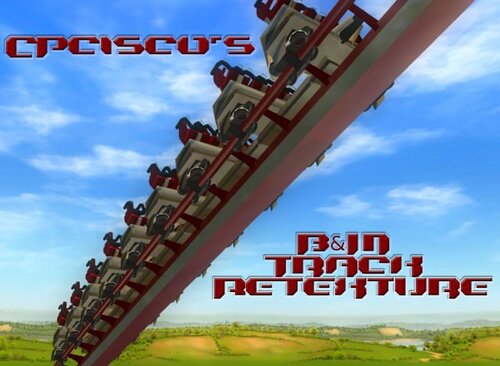 Thanks for downloading CPcisco's B&M Track Retexture!PLEASE READ THE README! !!WARNING!!: This has the possibility to mess up your Rollercoaster Tycoon 3 game if not done correctly. USE AT YOUR OWN RISK. Make sure to save a copy of the original texture OVL in a safe place before proceeding. Installation: THESE STEPS MUST BE FOLLOWED EXACTLY AS STATED! -------------- 1) Navigate to C:\Program Files\Atari\RollerCoaster Tycoon 3 Platinum\tracks\coasters\Track5. C:\ is being used as a generic hard drive location, you may have a different letter. 2) Find the two files at the bottom of the list named "Track5_Textures.common.ovl" and "Track5_Textures.unique.ovl". 3) Select both of these and copy and paste them into a safe place on your computer. 4) Now open the folder labeled "New OVLs" in the "CPcisco's B&M Track Retexture" folder. There should be two files here named, "Track5_Textures.common.ovl" and "Track5_Textures.unique.ovl". 5) Select both of these files and copy and paste them into the "Track 5" folder. Click "yes" to overwrite the previous files as you have them saved in a safe place. 6) Open the game and the new textures should be applied to any track that uses the B&M style track. Created by magoo666.
 -
 This will replace the Atari logo in the RCT3 introduction sequence with a SGW one. Please note that I am not responsible if your game crashes or lags. READ THE README! Created by StationJimJr.
 -
 Extract textures from in game and custom scenery sets. (Always ask the CS creators first before using their textures.)
 -
 This will replace the Atari logo in the RCT3 introduction sequence with a SGW Christmas one. NOTE: If the brightness for your game is turned up high, you might not be able to see the snow effect. Turn it down if you want to see it. READ THE README! Created by StationJimJr.
 -
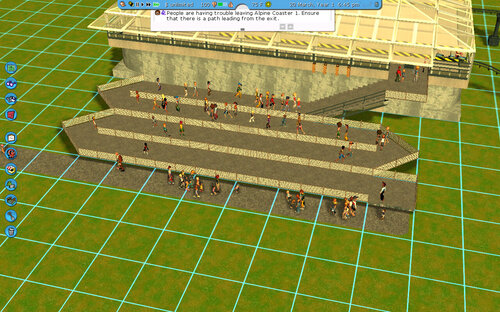 CS Neaded JackyX - Turnstyles Fences & Railings v1.2 Belgabor`s Invisible Doodads V1 Paths Covers And Train Tracks! ATH Catwalk & Coaster Accessories v1.2 Baffies Stations RCT3 Vanilla`s Glass Walls v2.1 Standard colered walls Instructions Make sure Belgabor`s Invisible Doodads V1 is downloaded and installed right!!!! place the building where you want. The large pathed are is the entrance. The coaster you make will ethier need two stations in the shown area or move the exit. Go into Que paths and use Belgabor`s Invisible Doodads V1 path (O picture) and follow the path, follow the rails.
 -
 The cinema complex from Rossland Adventure Park. There is enough space in the complex for 2 3D complexes Created by gio85.
 -
 Author: DasMatze This replaces all wooden supports in the game with 3D ones.
 -
 A prebuilt ride station of Oblivion at Alton Towers. :excl: You will need some CS: snakedoc227's Oblivion Station Kit Although the link, I'm not sure were this download could be (because it was on Vodhin.org which is closed now. :facepalm:) You may post this structure as long as you aqquire permission FROM ME!!! 💶 Created by Coasterboy.
 -
 This is my 1st custom building that you can download from me ;) This is a shopping mall that I made that has 2 floors, the 1st floor is the food court and the 2nd has all of the stores. This requires both soaked! and Wild! expansion packs to run or if you have rct3 platinum. Please make sure you read the readme prior to downloading because there is a list of custom scenery you need to have installed prior to running this file. Enjoy! Created by trainman0425.
 -
 PDF file by Belgabor with most recent notes on the Importer v18. Created by Belgabor.
 -
 The tool CTR_Creator V0.95 creates CTR-rides, -cars, -tracks and CFR-flatrides for RCT3. Created by Markus Lomberg.
 -
.thumb.jpg.a24e273441e4a757eca538a45e109b0c.jpg) Hello All Decides To Do A Custom Structure For djf's Medium Ferris Wheel CFR.. It Is Very Generic Themed But Can Be Changed And Colored To Suit Any Theme.. Installation Instructions And CS List Are In the Readme Created by ApocalypseProductions.
Hello All Decides To Do A Custom Structure For djf's Medium Ferris Wheel CFR.. It Is Very Generic Themed But Can Be Changed And Colored To Suit Any Theme.. Installation Instructions And CS List Are In the Readme Created by ApocalypseProductions. -
.thumb.jpg.9636af48cd70c4aed97f5d8efd003524.jpg) A mock exchange floor for demonstrating proper use of the SGWX Floor Major CS creators used: Ckef DasMatze Shyguy Moby Ralfvieah stuk71 StationJimJr Secondary CS sets: CJ's Intamin Supports Pat's Hout Weber's Path Enhancement Theiry's Postlamps & Banners Main Street USA Theiry's Phantom Manor Disneyland Paris Vodhin's Lighting Kit 2008 NYR's Concrete Walls Created by CTRSind.
A mock exchange floor for demonstrating proper use of the SGWX Floor Major CS creators used: Ckef DasMatze Shyguy Moby Ralfvieah stuk71 StationJimJr Secondary CS sets: CJ's Intamin Supports Pat's Hout Weber's Path Enhancement Theiry's Postlamps & Banners Main Street USA Theiry's Phantom Manor Disneyland Paris Vodhin's Lighting Kit 2008 NYR's Concrete Walls Created by CTRSind. -
 A list of track pieces for the ML03, ML04, and ML06 custom tracks that are part of the EP addon. Read the files to see how to use them, and note the extra sets of tracks at the bottom of the file. Created by Wacky Worm.
 -
-
 This is a set of grids for mesuring objects in RCT-3. These grids can be place horizontal or vertical and also be placed 0.1 meters apart. The grids come in opaque and transparent. Each red line is 1 Meter Each grean line is .5 meters Each Blue line is .1 Meters Your input is always welcome. Created by tnstickyboy70.
 -
Wheel Animation Tutorial by SLC Info: Difficulty: Medium / Hard Bone Knowledge Open your Sketchup model. You need to separate every single wheel. Name the wheels by right-clicking the wheel and select: “Entity Info.” Give the wheels the name: Wheel01. Then the next wheel will be Wheel02 etc. Measure the size of your wheel by drawing for example a line that shows the radius. In the middle, you add a text point like this: It needs to be exactly in the middle! If this is not done correct your wheels will do very weird in-game! Now change the text of the bone: ik_wheel01lt40. Explanation: “ik_” ~ is standard. “wheelXX” ~ this is the number of your wheel. If the bone is added to Wheel01 you need to rename the bone to: wheel01. “lt” ~ this stands for the side and radius. You always need to leave the t. You need to change the l to side of your model. If the model is on the right it should be: rt. r = right, l = left “20” is the radius. If it’s right you measured the wheel radius. If my wheel is 40cm big, you need to have: “40” Apply this to all of your wheels. Now export to “*.ase” and open it in the importer. Set coordinate system to: “Right-Handed Z-Up”. Once you’re in the model window, press the “A” in the effects window. Then press “Add Missing Effect Bones”. If it’s right you should see this: Add textures to the model and press “Ok”. Convert it to an animated model by clicking the “->” arrow. Open it again. Double click the bone. Slide down the “Assigned Meshes” box and select the right wheel (with right I mean: I used the bone ik_wheel01rt20 so the assigned mesh is “Wheel01” Once selected press the “+” Go to the box “Position 1” and press on the “E” Enter the value “270” Press “RotX” Press “Ok.” Do this to every wheel once you’re done! Click “Ok” and a LOD by clicking the “+” in the LODs window. I hope this tutorial helped! Created by SLC. Superlegochannel 2013©


-
 Pack One Of My Ride Scenery Structures Pack... List Of Necessary CS is Included In The Readme This Pack Includes Ferris Wheel Addon V.2 Magic Addon Carousel Building Discus Addon Greentree Addon (As A Bonus For You Guys) Tilt Building And Roof Crazy Bus Addon Please Report Any Problems To Me And Keep Your Eye Out For My Next Pack Thanks For Looking And Downloading. Created by ApocalypseProductions
 -
 A static structure designed to look like the actual ride. CS Required: -Moby's Steel Jungle -Moby's Glasswork -Ralfvieh's Warehouse set -GRP B&M Catwalks -CSF Steel I-Beam Set -CPisco's Steel Jungle Add-On -CPisco's B&M Footers WARNING: This a very detailed structure, it may not be too friendly on your game. It is actually why I had to remove it from Fisher Park. **Note: I took inspiration (with permission) from iOS, he deserves some credit for the inspiration for this structure. Created by Tomes1225.
 -
 CS blocks to test the function of each of the flags in the Importer. Also contains graphic representations of all the texture styles in the Importer. This set covers flags 33-64. Created by Vodhin.
 -
-
 A collection of .jpg's of a block object using each texture style setting from the Importer. (SIOpaqueCausticsGloss, SIGlass, etc.)
 -
-
 This is a basic 29 x 29 building that can be modified and used for small indoor theme parks, water parks, or anything else you might want. It is a basic design and I have used it in several of my parks. To install, move the DAT file to My DocumentsRCT3Structures. It requires the Soaked expansion pack to work. Created by Mikekart17.